


The following example demonstrates how to use NORMA for the base case and considers only natural ventilation. There are additional examples in the NORMA manual that consider different aspects of solar control including:
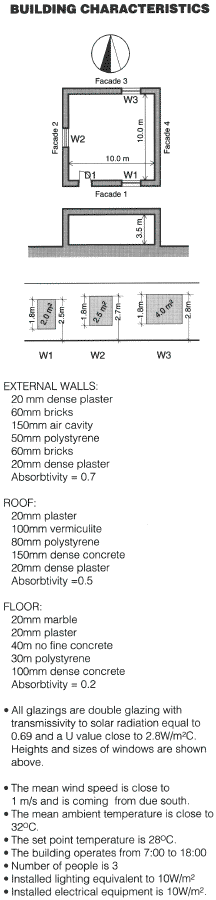 The building considered is described in the diagram to the left.
STEP 1 - Creation of the Opaque Elements
Define the opaque elements, i.e., the walls , floor and roof. The three elements are made up as follows:
| Element 1 | Element 2 | Element 3 | ||||
|---|---|---|---|---|---|---|
| Walls | Roof | Floor | ||||
| CODE | mm | CODE | mm | CODE | mm | |
| LAYER 1 | 701 | 20 | 701 | 20 | 525 | 20 |
| LAYER 2 | 503 | 60 | 506 | 150 | 701 | 20 |
| LAYER 3 | 407 | 50 | 407 | 80 | 509 | 40 |
| LAYER 4 | 417 | 150 | 505 | 100 | 407 | 30 |
| LAYER 5 | 503 | 60 | 701 | 20 | 507 | 100 |
| LAYER 6 | 701 | 20 | - | - | - | - |
STEP 2 - Calculate the air flow under Natural Ventilation
| Ventilated Volume | 350m2 | ||
|---|---|---|---|
| Number of external windows | 3 | ||
| External Temperature | 32oC | ||
| Internal Temperature | 28oC | ||
| wind speed | 1m/s |
For each window, enter geometrical characteristics from the diagram as required. Follow the Pressure Coefficient Help routine to determine the Pressure Coefficients. Using the following information, you should get the coefficients shown below.
| Window | Wind Direction | Wind Angle | Pressure Coefficient | ||||
|---|---|---|---|---|---|---|---|
| W1 | Windward | 0 deg | 0.4 | ||||
| W2 | Upwind | 90 deg | -0.4 | ||||
| W3 | Upwind | 180 deg | -0.25 |
STEP 3 - Description of the building
The building under consideration has 5 External Opaque Elements - 4 walls and a roof. The floor is not considered as it is in contact with the ground. The data for each of the 5 elements are as follows:
| Facades | Roof | ||||
|---|---|---|---|---|---|
| 1 | 2 | 3 | 4 | ||
| Area | 31 | 32.5 | 31 | 35 | 100.0 |
| Absorptivity | 0.7 | 0.7 | 0.7 | 0.7 | 0.5 |
| Tilt | 90 | 90 | 90 | 90 | 0 |
| Azimuth | 0 | 90 | 180 | -90 | 0 |
| Opaque Element | 1 | 1 | 1 | 1 | 2 |
After completion of the external opaque elements, you must proceed to the Glazed elements - option 2 of the Building Characteristics menu. Enter the data for each window as follows:
| W1 | W2 | W4 | |||||
|---|---|---|---|---|---|---|---|
| Tilt | 90 | 90 | 90 | ||||
| Azimuth | 0 | 90 | 180 | ||||
| Transparency | 0.69 | 0.69 | 0.69 | ||||
| Area | 2.0 | 2.5 | 4.0 | ||||
| Shading Factor | 1 | 1 | 1 | ||||
| U Value | 2.78 | 2.78 | 2.78 |
Next, proceed to the Floors and Operational Data - option 4 of the Building Characteristics menu, and enter the data as follows:
| Floor Area | 100m2 | ||
|---|---|---|---|
| Volume | 350m2 | ||
| Absorptivity | 0.2 | ||
| Infiltration Rate | 0.5 ach | ||
| Design Indoor Temperature | 28o C | ||
| Code of Floor | 3 | ||
| Occupational Factor | 3 |
Next, Describe the internal gains of the building - option 5 of the Building Characteristics menu, enter the data as follows:
| Horizontal area of building | 100m2 | ||
|---|---|---|---|
| Number of persons | 3 | ||
| Load due to lighting | 10 W/m2 | ||
| Load due to electrical equipment | 10 W/m2 | ||
| Any other load | 0 W/m2 |
Finally, you must input the Natural Ventilation Data - option 6 on the Building Characteristics menu. As previously calculated, there are 12 air changes per hour.
STEP 4 - Calculations
Before proceeding to the calculations, you must first load the relevant Climate File. This example was based on the ATHENS climate. To calculate the performance of the building when Air Conditioning is used press the C calculation option, (example screen image)